
As 2025 is almost over, it’s a great moment to look back at the main improvements in GPX Viewer and GPX Viewer PRO over the year. Our goal has been to make the app more flexible, easier to use, and packed with features that enhance your outdoor adventures. Both Android and iOS users have seen exciting updates this year, from new map styles and improved customization to enhanced stability, better tracking, and more intuitive navigation tools.
Main improvements in GPX Viewer PRO on Android
If you’ve been using GPX Viewer or GPX Viewer PRO for a while, you may have noticed how many options the app offers to adapt it to your own needs. Customization has always been important to us, and this year we added even more ways to fine-tune the app to match your exploring style.
Many new customization options
One of the areas we focused on was to provide new customization options. You can now adjust things like the size of waypoint icons, which helps keep the map readable whether you prefer a minimal look or detailed markers. Another useful addition is the option to choose a default zoom level for the Follow GPS feature. This means the map behaves the way you expect when navigation starts, without having to adjust zoom every time.


Brand new Outdoors offline map style
A major addition on Android is the new Outdoors offline map style. This map style is perfect for hiking, cycling, and outdoor exploring. It focuses on clear terrain presentation and better readability. If you want to dive deeper into Outdoors map style, check our blog post about it here.

Stability improvements and support for the latest Android systems
Not all improvements come in the form of visible features, but they are just as important. Throughout 2025, we put a lot of effort into stability improvements, reducing crashes to make GPX Viewer PRO more reliable in everyday use. At the same time, we added support for the latest Android systems, Android 15 and Android 16. This ensures that GPX Viewer PRO continues to work as expected as Android evolves, and that users can safely update their devices without worrying about compatibility issues.
Update of multiple language translations
Another improvement you might not notice at first glance is the update of multiple language translations. Better translations reduce confusion and make the app more accessible to users around the world.
Share location by deep links
We also added a small but very practical feature: support for sharing locations via deep links. When you share a location using this option, the person who receives the link opens it directly in GPX Viewer PRO and sees the exact spot on the map. This is especially useful when planning trips together, sharing meeting points, or pointing someone to a specific place you’ve discovered.


All these changes add up to a more flexible, stable, and user-friendly experience on Android, whether you’re planning routes at home or navigating outdoors.
Main improvements in GPX Viewer PRO on iOS
GPX Viewer on iOS was released later than the Android version. For this reason, the iOS app currently offers fewer features. In addition, GPX Viewer on iOS must follow Apple’s specific platform guidelines, which also explains some of the differences between the Android and iOS versions of the app. In 2025, we focused on bringing GPX Viewer PRO on iOS closer to the Android experience, while still respecting what makes iOS apps feel natural to use.
More map options
GPX Viewer PRO on iOS now offers a wider selection of maps. We expanded map options with support for Apple 3D Maps, which adds more depth and context when exploring mountainous areas. A new Outdoors offline map style was also added, designed for hiking, cycling, and other outdoor activities. On top of that, the Refill offline map style now supports customizable color themes, letting you adjust the look of the map to your preferences or visibility needs. We also introduced Mapy.com premium online map styles. These additions give users more freedom to choose the map that best fits their activity.


Redesigned map screen and sharing coordinates
The map screen itself was redesigned to improve everyday usability. The track recording and Follow GPS buttons were moved to the upper right corner, where they are easier to reach. A new map button was added next to them, making it faster to switch between online and offline maps or change map styles. In the bottom-right corner, we added zoom buttons and coordinates, allowing you to easily copy locations from online sources or share exact meeting points with your hiking companions. Follow GPS mode also received a refresh. The updated design leaves more space for the map, helping you focus on your surroundings while still keeping important navigation information available.

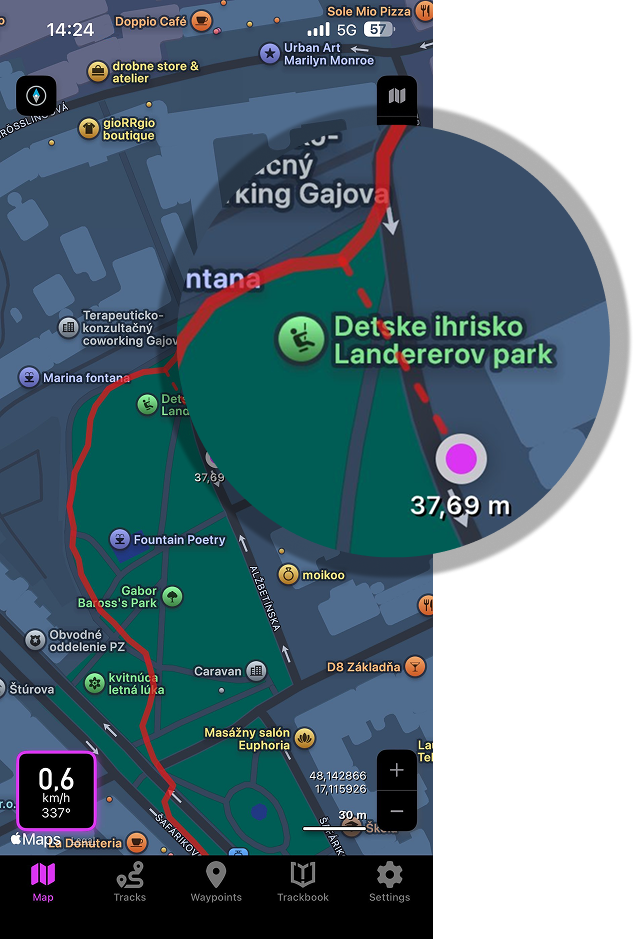
A completely new feature on iOS is the off-track warning in Follow GPS mode. When you move away from your planned route, a dotted line appears on the map guiding you to the nearest point on the track, along with the distance to it. This makes it easier to get back on track without guessing where you went wrong.
Off-track warning when following GPS
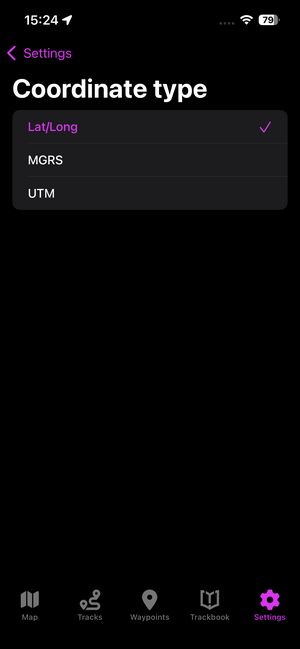
Set coordinates – now with MGRS and UTM
We also expanded coordinate options on iOS. In addition to latitude/longitude, you can now choose MGRS or UTM coordinate systems. This is especially useful for users who work with printed maps or prefer grid-based coordinates for navigation and planning.
Import and export dialogs
Managing your data became more flexible as well. The new import and export dialogs give you better control over tracks and waypoints. For example, before exporting, you can choose whether to save your data in GPX, KML, GPZ, or KMZ formats, depending on how and where you plan to use your files.

Show current GPS position on the map chart
The map chart was improved to show your current GPS position on the map chart. This means that while you scroll through the chart to check elevation or other data at different track points, you can still see where you are right now and compare your position with the rest of the route.

Edit metadata of Trackbook tracks and waypoints
Finally, we improved Trackbook synchronization. With a subscription to our Online Services, you can now edit metadata of Trackbook tracks and waypoints directly. This gives you more control over names, descriptions, and details, helping you keep your Trackbook library organized across devices.

Looking back, it’s clear that 2025 brought meaningful improvements to both GPX Viewer PRO on Android and iOS. We hope you enjoy using them on your hikes and trips, and stay tuned for more updates in the coming year.