We’ve added a few practical features that make working with GPX Viewer PRO even more comfortable. With version 1.30, you can choose from more coordinate types, view and share precise coordinates, tap POIs on online maps, and access recent changes more easily. The map screen has also been redesigned to make important tools quicker to reach. Here is an overview of the update.
Redesigned map screen
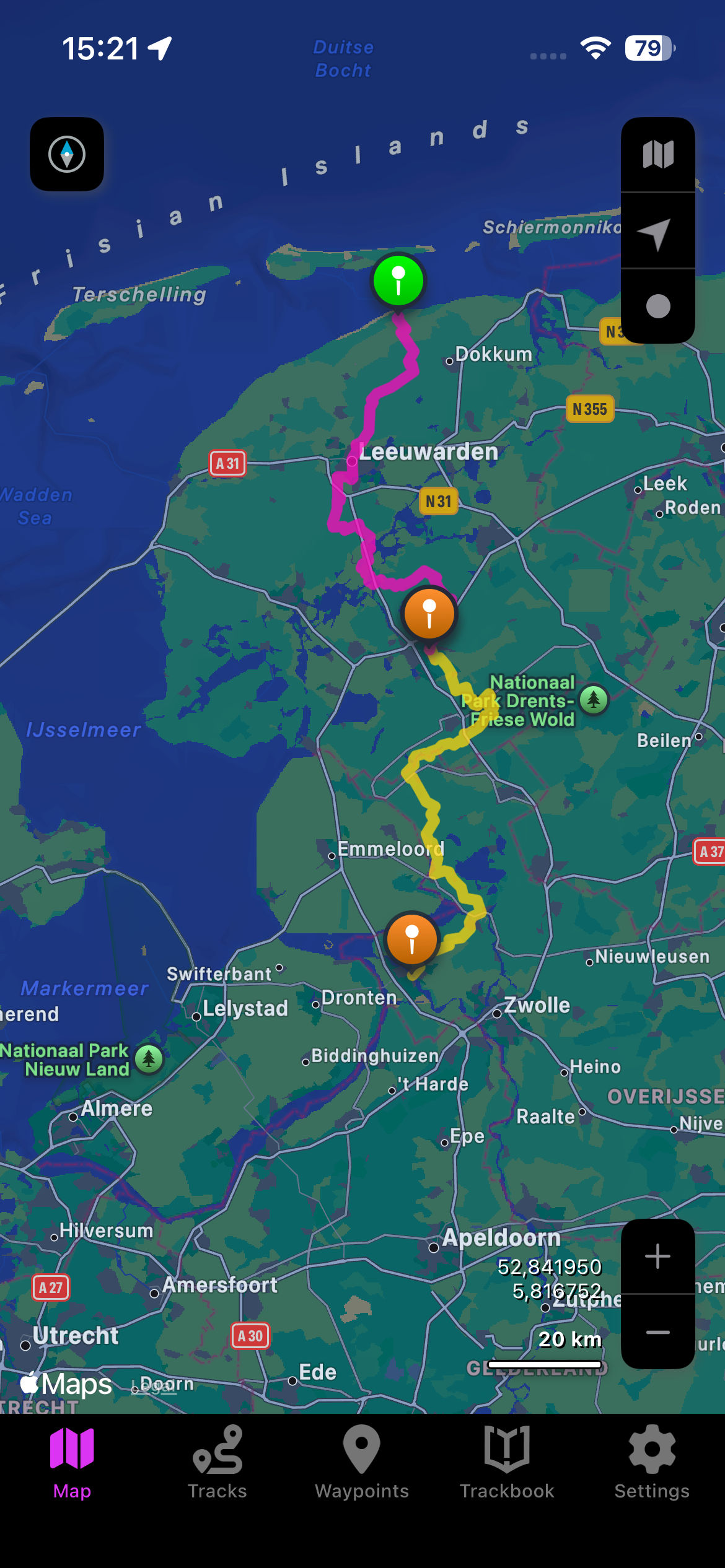
The map screen now has a cleaner layout designed to keep the most important tools within easy reach and to help you focus on the map itself. Track recording and Follow GPS buttons moved to the upper right area. The new map button in this area lets you switch between online and offline maps or between map styles even faster.
When Follow GPS mode is active, your speed and altitude appear in the bottom-left corner. This small improvement saves you space on the map.
The look of Track recording mode has been refreshed for a more intuitive experience. Once you start recording, a small set of extra buttons appears on the right side of the screen. These buttons let you pause or stop the recording or add a waypoint easily.
Another improvement is the addition of zoom buttons in the bottom-right corner of the map, making it easier to adjust your view quickly while navigating.

Two new coordinate types: MGRS and UTM
Not everyone works with latitude and longitude. Some hikers and outdoor professionals prefer grid-based coordinates such as MGRS or UTM, especially when reading printed maps. GPX Viewer PRO now supports both systems. This means you can switch to the coordinate type that matches the tools or maps you already use, without having to convert anything manually. You can set a preferred coordinate format in the settings.

Coordinates directly on the map
Sometimes you want to check if you’re standing exactly where you should be. Other times you want to mark a precise location you’ve found during your research. With this update, coordinates are now displayed in the bottom-right corner of the map screen, this makes it easier to confirm where you are or mark a precise spot.
Found coordinates of an interesting place online? Just copy them, open GPX Viewer PRO, tap the coordinates, paste the copied coordinates to the coordinates window, and instantly jump to the place you want to explore. This works great when checking spots shared by fellow hikers, bloggers, or travel guides — you can verify the exact place in seconds.

Share coordinates with your friends
When you plan a trip with others, sometimes all you need to share is one point: a meeting spot or an interesting location you discovered. The new sharing option make this much easier. It reduces the chance of misunderstandings, especially when planning in a group or coordinating with people who use different map apps.
Just tap the coordinates in the bottom-right corner and tap the share icon in the coordinates window. You can send coordinates as plain text, share them in GPX Viewer PRO, or share them in other apps such as Apple Maps, Google Maps, or Mapy.com. It’s fast, flexible, and helps everyone get to the right place without confusion.

Tapping POIs on online maps
Online maps become more useful when you can interact with them easily. POIs on the Apple Standard and Hybrid maps are now tappable. When you tap a point of interest, it becomes larger so you can immediately see what you selected.
This helps when you zoom out to understand the area around a POI without losing what you tapped. Whether you’re looking at shops, attractions, transport points, or services, this small detail makes map exploration more intuitive.

Easy access to recent app changes
Wondering what changed after the last update? A new Changes section in the app settings lets you check all improvements whenever you want. It’s a simple way to stay informed, especially if you notice something looks different on the map or in the menus. No more guessing what was updated — everything is listed in one clear place.

These changes make the app a more practical and user-friendly tool for outdoor activities. Try the new features during your next trip and see how they fit your style of exploring. We’re already working on further improvements to make GPX Viewer PRO even more helpful for your adventures, so stay tuned for the next updates.